
By Web Dashers Wiki · Independent guide. Developer material and community rules reviewed November 3, 2026. Steps below follow the published browser build; individual features remain in development.
Play the browser project
The creator’s game is hosted at web-dashers.github.io. It runs in a browser tab and opens separately from this wiki. Use that address as your reference when comparing a problem with another player; a similarly named site can embed a copy, run a fork or use different storage.
The project describes itself as a modded Geometry Dash demo and remains in development. Its README is the best starting point for what the developers claim is implemented and what they still consider unfinished. Opening the main menu is not evidence that every online course, object or game mode works.
Before switching between sites, preserve any locally created levels. A new host or browser profile does not automatically inherit the old location’s storage. Keep the exact address with your progress notes and use a separate .gmd export for important editor work.
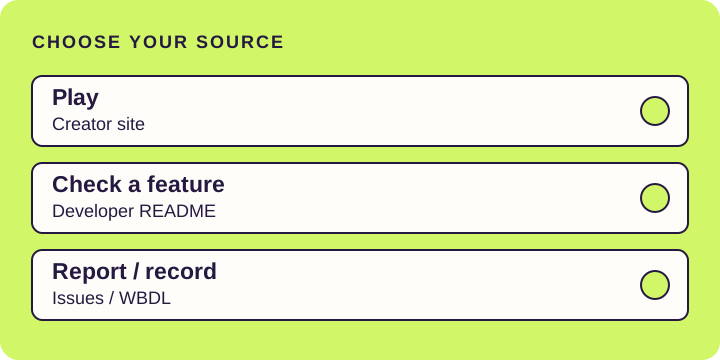
- Play on the creator’s site — Browser game. No game files are hosted by this wiki.
- Read the control guide — Choose an input and check the relevant mode limits.
- Save and export a created level — A level backup is separate from a player profile.
Check a feature before building around it
The public GitHub repository contains the developer’s feature notes and the browser project’s code. The README lists main-menu levels, online levels, an icon kit and additional settings. It also identifies unfinished practice, editor, slope and object behavior, and says Swing is not implemented.
Use the README for the broad status and the relevant file for the exact behavior. A menu option can exist before every part of its workflow works reliably. Likewise, the presence of account-related code does not establish a working cloud backup service.
The source is publicly readable, but that does not give blanket permission to redistribute every game asset, song or brand element it references. This resource page links the original project. It does not package the game, create an unofficial download or claim a license over material belonging to other owners.
- Read developer features and known limits — Project documentation; its own update date is separate from our review date.
- Browse the original source repository — For checking behavior and the project’s contribution context.
- Check online-level and editor limits — Keep a successful search separate from a compatibility check.
Understand which game you are opening
In a Reddit discussion, Rewrite_Sam described trying Web Dashers without owning Geometry Dash and asked how the community viewed it. That is a player’s question about the relationship between the games, rather than a developer statement about authorization or compatibility.
The project README describes Web Dashers as a modded Geometry Dash demo with extra features. Treat it as that browser project, with its own unfinished features. It does not establish ownership of the retail game, a full retail feature set, or transferable records. This wiki is independent of both the browser project and RobTop Games.
- Read Rewrite_Sam’s original discussion — A player concern; it does not determine the project’s permissions or legal status.
Report a bug with enough detail to reproduce it
The developer points bug reports to the repository’s Issues page or the bug-report area of its linked Discord community. Search existing issues first. A matching report can show that the problem is already known and help you avoid adding another report with no new details.
Use the same inputs someone else can repeat: exact game address, browser and device, level name and numeric ID where relevant, settings, and the smallest sequence that causes the problem. Say what you expected and what happened. A short recording of the affected section is usually easier to investigate than an unexplained full session.
Keep your report focused on an observation. For example, say that a mobile number field did not accept input rather than claiming that every phone is broken. Do not attach passwords, account cookies or a raw browser storage dump. Posting an issue or joining a community may require a separate platform account; reading a public issue does not mean you have submitted anything.
- Search for the exact symptom in existing issues.
- Write down the level, browser, device and relevant options.
- Reduce the reproduction to a short sequence.
- Capture only the information needed to show that sequence.
- Use the developer’s reporting destination and keep the report link.
- Search the developer issue tracker — Public reports and discussion; a report is not proof of its proposed cause.
- Find the developer’s community link — Use the current invite from the project rather than an unrelated server.
Prepare a browser-list attempt
WBDL supplies the browser-focused demon list and its own submission guidelines. Use the live list to identify a course, then read the rules before recording. It restricts hosts, settings and editing and requires audible inputs or a handcam.
The Web Browser Impossible List is a different resource, with entries and world-record progress aimed at the game’s human limit. Read it as that kind of list. An entry there is not a recommendation that a newcomer can clear it, and a displayed progress record is not automatically a full completion.
Our list guide explains the distinctions and provides a preparation checklist. It does not mirror changing rankings or submit a record for you. List reviewers decide whether a particular level or recording is eligible.
- Open WBDL — Live level entries and records.
- Read current WBDL guidelines — Check this before recording, not only after a completed run.
- Open the Web Browser Impossible List — A separate list; inspect each entry’s actual progress evidence.
- Use our browser-list preparation guide — Settings, recording and submission distinctions in one place.
Choose a resource by the answer you need
If your question is where to play, use the creator’s game link. If it is whether a mode or editor feature is implemented, check the developer notes and the relevant guide. If something reproducibly fails, use the issue tracker. For a leaderboard attempt, follow the list organization’s own rules.
You do not need to download an unfamiliar executable, install an extension or provide a game password to read these guides. If a destination asks for an account, confirm that you are on the expected platform and understand the action you are taking. This page provides original-source links rather than alternative account or download services.
Resource availability can change. The links and descriptions here were reviewed on November 3, 2026; that date is not a claim that the resources themselves were updated that day. If an entry moves or its scope changes, send a correction with the destination and the behavior you saw.
Quick answers
Where can I find the original Web Dashers project?
The creator site is web-dashers.github.io, and its GitHub repository is web-dashers/web-dashers.github.io. Use the project README for its feature notes and community links.
Is Web Dashers the full official Geometry Dash game?
The developer describes Web Dashers as a modded Geometry Dash demo with added features. It is a separate browser project with unfinished functionality. This addresses the relationship raised in the linked player discussion.
Does this page provide game downloads?
No. It organizes original-source links for the browser project, developer documentation, reports and list rules. The wiki does not distribute a full Geometry Dash download or repackage the game assets.
Where should I send a game bug?
Start with existing GitHub Issues or the developer community linked from the README. Include the exact address, device, browser, level and reproduction steps. Guide corrections belong at this wiki’s contact page.
Sources & review
These are original project and community-list resources reviewed for their stated purpose. We link the resources at their source and do not rehost game files, player media or asset packs. External availability and list decisions remain with their owners.